



Blog / Technology

How to Connect Your Phone to Your Chevy

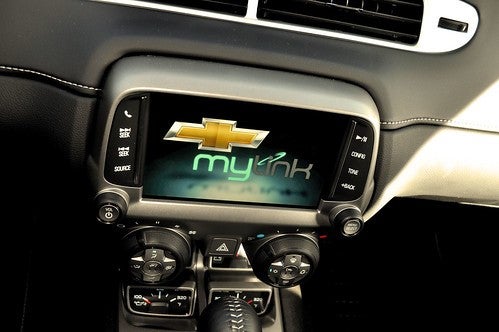
Chevrolet drivers from Baltimore to Washington, D.C. are impressed with Chevrolet's new Infotainment 3, the latest in-vehicle technology package. The Infotainment 3 system, also known as Chevy MyLink, syncs seamlessly with your smartphone and features pre-installed apps. In addition, the system enables hands-free operations of your cellphone. 

You can download your favorite apps right from the touch screen to further customize your experience. Also, you can operate your vehicle remotely using the Chevy app from your cellphone. If you've recently purchased a Chevrolet and want to know how to connect your smart device to your Chevy, we've got your answers here.

What Models Have Chevy Infotainment Technology?

For over a decade, Chevrolet has been using touch-screen technology in their vehicles. In the beginning, Chevrolet offered touch-screen infotainment systems as an available option or part of an optional package, so not every Chevy vehicle has the system. Any car manufactured in 2012 or later with a touch screen will have the infotainment operating system. It wasn't until the 2017 model year that Chevrolet began installing the infotainment systems as standard equipment on every model. You might find some of these varied models among the new and late-model Chevy vehicles we have available.

You should know that the technology has advanced over the years, resulting in subsequent generations. The current generation, Chevy Infotainment 3 or Chevy MyLink, has more built-in apps and added functionality than older systems, but connecting and operating the different generations remains the same.

How To Connect Your iPhone

Connecting your iPhone to the Chevy Infotainment system takes minimal effort if you have a compatible iPhone and the factory-issued Lightning cable. Any iPhone 5 or newer using the iOS 7 operating system will connect. However, some aftermarket cables won't work, so be sure you have the original cable or an OEM replacement from Apple. 

Your infotainment screen has an Apple CarPlay icon on the Home screen, so you won't have to download an app. To connect, first make sure your vehicle is running and in Park. Then, connect your Lightning cable to your vehicle's USB data port. Next, plug your iPhone into the Lightning cable. The Apple CarPlay icon will illuminate, signaling you're connected. Next, you can select the apps you want to use on your Chevy's infotainment system. The first time you connect, you must accept the terms of service before you can begin enjoying the system.

How To Connect Your Android Phone

Most other cellphones use the Android operating system platform. Fortunately, Android Auto connectivity is quick and straightforward. Older models require you to download the Android Auto app from the Google Play Store to your smartphone, while select newer models have the information preloaded in your infotainment system similarly to Apple CarPlay.

Start your car and remain in Park. After downloading the app to your cellphone, you'll need to plug your phone's USB cord to your vehicle's USB data port. Use the factory cord, as aftermarket cords may not work. Once plugged in, the Android Auto icon will illuminate. Then, you can select the apps you want to display on your Chevy's touch screen. But, again, the first time you connect, you have to accept the terms of service.

Customizing Your Homepage

Your Chevy Infotainment system has easy-to-use, intuitive controls that enable you to quickly customize your Homepage. To enter the edit mode, touch and hold the icon you wish to move. Then, you can drag the icon to your desired position and release your touch.

You also can set user profiles with individual radio presets, HVAC settings, and other convenience features. The "Settings" button on your Homepage provides you access to all your options. Select the desired menu tab, then select the feature you want. Hit the "Back" button to return to the previous menu when you finish.

Using Voice Commands

Today, your Chevy Infotainment system recognizes natural voice commands. To use voice commands, press the "Talk" button on your steering wheel. Your sound system will play a prompt followed by a beep, signaling it's listening. Like your favorite home assistants, your Chevy Infotainment system hears your commands and responds. Say "Tune the radio to 100.7," "Call Jennifer," or even say "Help" to call for assistance.

Navigation

Some Chevy Infotainment systems have built-in navigation. You can operate this using the touch screen or by voice command. Your navigation system uses multiple map formats provides turn-by-turn directions and a voice guidance option. Alternatively, you can use your cellphone's navigation system to provide directions.

Available Apps

In addition to selecting apps from your cellphone, your Chevy Infotainment system has an App icon that you can use to browse available apps. You'll need an internet connection through your available 4G LTE Wi-Fi hotspot or data plan. Chevy Infotainment systems come with some popular apps preloaded. They include:

Onstar

Drivers love the elevated experience that Onstar delivers. You'll get a free trial subscription to the service when you purchase a new or late-model vehicle from Koons Clarksville Chevrolet GMC. These trial subscriptions vary depending on the car you purchase, but you can sign up for the plan that suits you best when your free trial ends.

SiriusXM Satellite Radio

Depending on the vehicle you buy, you'll receive one of several SiriusXM satellite radio subscriptions. SiriusXM offers thousands of radio, music, news, sports, and entertainment programming options.

Pandora

With Pandora preloaded on your Chevy Infotainment system, you can easily stream your favorite music. You can personalize your programming to reflect your varied tastes.

Stitcher for Podcasts

One of the most popular podcast platforms today, Stitcher offers over 100,000 podcasts and radio shows. You can stream directly to your infotainment system or your compatible iPhone or Android smartphone.

Teen Driver Training

One of the most popular apps in the Chevy Infotainment system helps parents teach their teens to learn responsible driving habits. Moms and dads can preset parameters such as muting the radio if the seatbelts aren't fastened or alerting them when their teenager exceeds preset speed limits. The system even provides you with report cards that deliver insight into your teen's driving habits.

At Koons Clarksville Chevrolet GMC, we know how important staying connected to your busy life is. With Chevy's Infotainment system technology, it's easier than ever. If you're interested in a hands-on demonstration of the technology, you can contact us online or stop by our dealership at any time. One of our friendly, knowledgeable staff members will answer all your questions.


Image via Flickr by Dale Earnhardt Chevrolet | Licensed by CC BY 2.0
Posted in:

Related Posts

2023 Chevrolet Traverse Interior Features and Infotainment

If you're looking for a large, spacious SUV, then the 2023 Chevrolet Traverse may be the vehicle for you. This powerful vehicle comes packed with entertainment and comfort features to keep you and your passengers engaged no matter how long your trip is. Extra cargo space and options for better infotainment systems can increase your satisfaction with this vehicle. Keep reading to discover Koons Clarksville Chevrolet GMC's spotlight on the 2023 Chevrolet Traverse interior. 2023 Chevrolet Traverse Trim Levels The 2023 Chevrolet Traverse comes in six trim levels, though each one offers both front-wheel drive and all-wheel drive options you can choose. Additionally, the trim levels can affect other features both inside and outside the vehicle, which can affect the amount of space on the inside of the vehicle for cargo and passengers. Below are the trim levels you can choose: LS: This is the base model of the 2023 Chevrolet Traverse. LT-Cloth: The second tier of the trim levels offers a few more comfort options and interior materials. LT-Leather: This is the third tier of trim levels and offers simply a leather interior instead of the cloth option of the previous one. RS: This tier is where major changes to the style and materials of the vehicle start to occur. Premier: The second-to-last trim level offers a balance of the RS features and performance and the High Country features. High Country: The ultimate luxury version of the Traverse, this trim level includes comfort and technology packages to wow you and your passengers. Interior Dimensions The interior dimensions of the 2023 Chevrolet Traverse remain largely the same across multiple trim levels. The one exception is the High Country edition, which has larger infotainment features and slightly less space for passengers and cargo. Below are the descriptions of the interior dimensions of each trim level: LS, LT-Cloth, LT-Leather, RS, and Premier Depending on your lifestyle, you may need space for either passengers or cargo. Below are the measurements for both types of space inside the 2023 Chevrolet Traverse: Front headroom: 42.80 inches. Front legroom: 41.01 inches. Front shoulder room: 61.91 inches. Front hip room: 58.10 inches. Second headroom: 40.02 inches. Second legroom: 38.41 inches. Second shoulder room: 62.16 inches. Second hip room: 56.91 inches. Third headroom: 38.21 inches. Third legroom: 33.48 inches. Third shoulder room: 57.50 inches. Third hip room: 48.50 inches. Cargo behind the first row: 98.20 cubic feet. Cargo behind the second row: 57.80 cubic feet. Cargo behind the third row: 23.00 cubic feet. High Country The High Country comes with more comfort and technology features, so it has somewhat less space than the other trim levels. Despite this, it still has plenty of space for your cargo and passengers: Front headroom: 41.44 inches. Front legroom: 41.01 inches. Front shoulder room: 61.91 inches. Front hip room: 58.10 inches. Second headroom: 39.00 inches. Second legroom: 38.41 inches. Second shoulder room: 62.16 inches. Second hip room: 56.91 inches. Third headroom: 38.21 inches. Third legroom: 33.48 inches. Third shoulder room: 57.50 inches. Third hip room: 48.50 inches. Cargo behind the first row: 98.20 cubic feet. Cargo behind the second row: 57.80 cubic feet. Cargo behind the third row: 23.00 cubic feet. Interior Colors and Materials Another update to the 2023 Chevrolet Traverse is the materials it uses for its interior. Depending on the trim level you choose, you can have a durable cloth interior or a leather interior. Chevrolet designed each one to last for the entire lifetime of the vehicle under normal wear and tear. The interior also comes in a combination of jet black and other colors, including chai for both leather and cloth and then leather options in red, maple, black, and clove. These colors depend on the trim level of your Traverse and improve the style of the interior. Entertainment For entertainment options, the LS and LT-Cloth trim levels come with a 7-inch infotainment system with a touch screen, and the LT-Leather features a slightly larger touch screen that's 8 inches. At the RS trim level and above, the vehicle comes with an 8-inch touch-screen infotainment system and an included navigation system. For even more entertainment, you get a wireless charging station for your smartphone, which can help you stay connected with your everyday life while inside your vehicle. This option comes on every trim level except the LS. Finally, the vehicle comes standard with Wi-Fi hotspot capability. Comfort Depending on the trim level, you can get massive comforts, though those that come standard on the base model are plentiful. You get 10 cup holders spaced throughout the vehicle to hold drinks safely. At the RS level and above, you also get a 120-volt power outlet so you can connect after-market technology to the vehicle, such as chargers for devices, speakers, and remote access. Remote access can allow you to lock the doors and run diagnostics across all trim levels. At higher trim levels, you can even start your Traverse remotely. If these features aren't enough, there's plenty more to help you create a comfortable driving experience. Reduce road noise inside the vehicle cabin with active noise cancelation, or use the adjustable seats in the front seats to find your perfect seating arrangement. Depending on the trim level, the seats may be manual adjustments or powered. Safety The 2023 Chevrolet Traverse comes packed with plenty of safety features to help you navigate no matter the conditions. First, the SUV comes with a suite of monitors and alerts to keep you aware of your vehicle's surroundings. These include features like forward collision alerts and front pedestrian braking. It also includes features such as lane keeping and classic safety systems such as air bags, seat belts, and LATCH systems to keep you and your passengers safe in the event of an accident. Now that you've learned about the interior of the 2023 Chevrolet Traverse, you can visit Koons Clarksville Chevrolet GMC to look at this spectacular vehicle in person. Meanwhile, you can view an online inventory of new vehicles, research parts and services for your current vehicle, and learn about ways to finance your next vehicle purchase. Contact us today to learn more about the services we offer. We're happy to hear from you.

How To Use Driver Mode Control

You may want a sportier and a more responsive driving experience with your vehicle from Koons Clarksville Chevrolet GMC. But what's the best way to use your vehicle's Driver Mode Control setting? Driver Mode Control, sometimes called the Traction Select System, is a unique automotive technology that lets you customize your car to suit your driving style. Its purpose is to enhance comfort and control so you can stay focused on the road ahead. It tailors your vehicle's throttle response, steering feel, shift points, and suspension settings. We'll walk you through what's needed to optimize your driving performance using this setting. Choosing a Drive Mode With so many options, how do you know which mode to choose? The answer depends on what you want to get out of each mode. But here is a summary of each mode's functionality. Tour/Normal Mode This mode is the default setting and is the best option for everyday driving . It adjusts the vehicle's settings automatically to provide the best handling for regular use. The Tour mode enhances your comfort, taking over almost all controls from the driver. Sport Mode The Sport setting tunes the vehicle's powertrain performance to provide an excellent throttle response, ensuring the steering feels comfortable while driving. As a result, you'll notice more responsive acceleration, direct steering input, and better low-speed handling. You'll also have reduced powertrain, brake, and steering assistance when using Sport mode. Track Mode This mode is great for track or rally racing situations, especially for enthusiasts who want to take their driving to the limit. It uses different calibrations for the vehicle's transmission, exhaust system, and other components. While this can be great on the track, it can result in delayed traction transitions when driving your vehicle on the street. Snow/Ice Mode If you live in a region that gets snow and ice, this mode will help you out. It makes the throttle more sensitive to help you stay in control while driving in wintry conditions. It also increases the steering responsiveness to enhance control in icy conditions. Off-Road Mode Off-road mode is built for those times when you want to take your vehicle to the mountains or on rugged terrain. It tunes the suspension and transmission responsiveness for a smoother experience on rough terrain. It’s ideal for driving on dirt roads or in rugged environments, such as deserts or forests. Tow/Haul Mode Select this mode for instances where you need to tow a long object. Tow/haul mode changes the transmission's gears and mapping, optimizing them for towing and heavy hauling. It also dials down the throttle sensitivity to prevent jerky starts and modifies other vehicle settings as needed. Terrain Mode This setting adjusts the suspension, steering angles, and transmission shifts to suit the road's surface and terrain, allowing you to drive comfortably over rough or bumpy dirt roads. It tunes your vehicle's performance to work best in different geographies and can also apply the appropriate brake to each wheel. My Mode This unique mode lets you define your custom settings. It's best to adjust the mode's settings to suit local roads and conditions. You can set the suspension, transmission, and throttle response to suit your needs. You can also set the comfort features according to your preferences. AWD Mode If you have an all-wheel-drive vehicle, this setting optimizes the performance of all four wheels for driving on roads and off-road. It also makes the engine more responsive and provides better traction under acceleration. Z Mode This mode can help you drive more confidently when facing slippery roads or icy conditions. It increases the transmission's gear ratio to reduce engine speeds when necessary, helping you maintain control of the vehicle. It can be used in conjunction with AWD and front-wheel and rear-wheel drive. Tips For Using Your Vehicle's Driver Mode Control Depending on the model and year of your vehicle, you might find some settings are unavailable or limited to a single mode. But here are some tips for getting the most out of your vehicle's Driver Mode Control: Don't change your driving mode in city or residential areas — it's safest to let your vehicle run in normal mode. Always remain attentive when using your vehicle's Driver Mode Control, as your personal preferences may not always match the driving conditions. Refer to your owner's manual for more details on how to customize your vehicle's Driver Mode Control settings. Ensure your vehicle is in full working order before using the Drive Mode Control feature, as incorrect adjustments could compromise your safety. Adjust the settings of the selected mode on the driver's display by tapping the menu button and pressing "N." How To Use Drive Mode Control Using a Knob To Select a Mode Take the following steps to select a mode using a knob: Dial the knob to select a mode. Adjust the knob as necessary to match your preferences. Repeat step two to access other modes. Using a Push Button To Select a Mode To use a push button to select a mode, follow the below steps: Push "N" on the push button to access the main menu. Select a mode (example: "Sport") Adjust the knob as necessary to match your preferences. Repeat step two to access other modes. Final Thoughts The Driver Mode Control setting is a unique feature that makes your vehicle more enjoyable and responsive. While you can adjust it to match your driving preferences, you should always maintain control if you notice anything abnormal during your drive. Visit Koons Clarksville Chevrolet GMC today to see how to use this feature in your vehicle. Why Choose Koons Clarksville Chevrolet GMC? The Koons Clarksville Chevrolet GMC team loves solving automotive problems and helping our customers find the perfect vehicle for their needs. We believe every customer deserves to feel comfortable in their car. That's why we offer convenient financing options, industry-leading service, maintenance plans, and licensed professionals on staff to make your purchase a great and worry-free experience. Image via Chevrolet Press Release

Chevy Silverado Towing

Chevy Silverado Towing Tips and Tricks

If you're looking for a reliable vehicle that can tow heavy loads with ease, the Chevrolet Silverado should be at the top of your list. Its impressive features make it a favorite for Maryland drivers who want a workhorse of a truck that's also a pleasure to drive. In this article, we'll discuss some of the key towing capabilities of the 2023 Silverado and provide valuable tips that can help you get the most out of this pickup when you're towing a trailer or another vehicle. more Overview of the 2023 Chevrolet Silverado 1500 The 2023 Silverado 1500 is a powerful truck with a high-strength steel body, a fully boxed frame, and a range of engine options that provide impressive horsepower and torque. It also boasts a comfortable cabin with a user-friendly infotainment system and plenty of convenience and safety features to enhance your driving experience. The latest Silverado doesn't stray far from the already successful design of the previous models. It features a wide grille, angular headlights, an imposing front end, and chiseled body lines that give it a robust, muscular look. There are also no noteworthy alterations to its interior. The only significant change for the 2023 model year is the upgraded Duramax diesel engine that produces more power and torque. 2023 Chevrolet Silverado Payload and Towing Capacity The Silverado has a maximum towing capacity of 13,300 pounds. However, the powertrain you choose can affect this, as evidenced by the 9,000-pound ceiling if you go for the four-wheel-drive (4WD) crew cab model with the 2.7L turbo engine. You should know how much the Silverado can tow with each engine and cab configuration so that you can make the best choice for your needs. Here's a quick look at the maximum towing and payload capacities of each version of the Silverado, along with the max power output for each engine option: 2.7L Turbo Maximum towing capacity: 9,500 pounds for the 2WD regular cab and long bed. Max payload: 2,260 pounds for the 2WD regular cab and standard or long bed. Power: 310 hp and 430 lb-ft of torque. 5.3L EcoTec3 V-8 Maximum towing capacity: 11,300 pounds for the 2WD crew cab and short bed when equipped with the Max Trailering Package. Max payload: 2,140 pounds for the 2WD regular cab and long bed. Power: 355 hp and 383 lb-ft of torque. 6.2L EcoTec3 V-8 Maximum towing capacity: 13,300 pounds for the 4WD double cab and standard bed in the  RST trim when equipped with 20-inch wheels and the Max Trailering Package. Max payload: 1,980 pounds for the 4WD crew cab and short bed with the Max Trailering Package and 18- or 20-inch wheels. Power: 420 hp and 460 lb-ft of torque. 3.0L Duramax I-6 Turbo-Diesel Maximum towing capacity: 13,300 pounds for the 2WD crew cab and short bed or the 2WD double cab and standard bed, both with 20-inch wheels and the Max Trailering Package. Max payload: 1,970 pounds for the 2WD double cab and standard bed when equipped with the Max Trailering Package and 18- or 20-inch wheels. Power: 305 hp and 495 lb-ft of torque. The towing capacity of the 2023 Silverado differs depending on the cab, bed, and engine selected. If you want to know more, contact us. Our knowledgeable staff can walk you through the various options to find the model that best suits your towing needs. About the Max Trailering Package If you look at the specifications in the previous section, you'll notice that the Silverado achieves the maximum figures for towing and payload capacity when it has the Max Trailering Package. This is because it adds a host of features that enhance the truck's towing capabilities, including the following: Advanced cooling system for the engine and transmission. Upgraded suspension system. Trailer brake controller. Trailering equipment. Heavy-duty rear springs. Improved rear axle ratio. Integrated trailer camera system. The Max Trailering Package is available for select Silverado trim levels, specifically the LT, RST, LTZ, and High Country. A basic trailering package is already standard in all trims except for the Work Truck, so even if you forgo the Max Trailering Package for your Silverado, it'll still be well equipped for towing. Towing Tips for the Silverado 1500 Towing heavy loads can be intimidating, but it's a breeze if you have the right equipment and knowledge. If you're planning to tow with your Chevrolet Silverado 1500, there are several things you can do to ensure a safe towing experience. Here are some valuable tips to help you get started: Check your truck's tow rating: Knowing the maximum weight your truck can safely tow is essential. This information can usually be found in your owners manual or by contacting the manufacturer. Ensure your trailer hitch meets the right standards: Be sure that your trailer hitch is compatible with your truck and meets the appropriate safety standards. A poorly installed or incompatible hitch can be dangerous and cause accidents. Distribute weight evenly throughout the trailer: When loading up your trailer, make sure to spread the weight evenly throughout. This will help prevent swaying and ensure that your truck handles properly while towing. Adjust your driving habits: Towing a trailer requires some adjustments to the way you drive. Be sure to take turns slowly and gradually, and leave plenty of space between you and other vehicles on the road. Be mindful of braking distance: Towing a heavy load will increase your stopping distance, so it's important to give yourself plenty of room to stop when approaching intersections or other vehicles. Regularly inspect your vehicle and trailer: Before each trip, inspect both your truck and trailer for any signs of wear or damage. This includes checking tire pressure, brake lights, turn signals, and other safety features. Use your mirrors and cameras: These tools help you monitor the trailer and ensure it stays in line behind you. If you plan to use your Silverado for towing regularly, consider getting the trailer camera system that's available on specific Silverado trims. The 2023 Chevrolet Silverado boasts impressive towing and payload capacities across its range of powerful engine options. It's important to be aware of these figures in order to determine which trim and powertrain combination will best fit your needs. If you have any questions or concerns about towing with your Silverado, give us a call or visit us at Koons Clarksville Chevrolet GMC for expert advice and assistance.